ラズパイ(4,5,Zero)で照度(illuminance) や輝度(Luminance)の値を取得してみましょう。
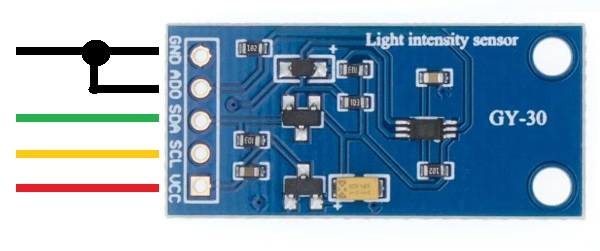
こういうセンサーを使います。
接続
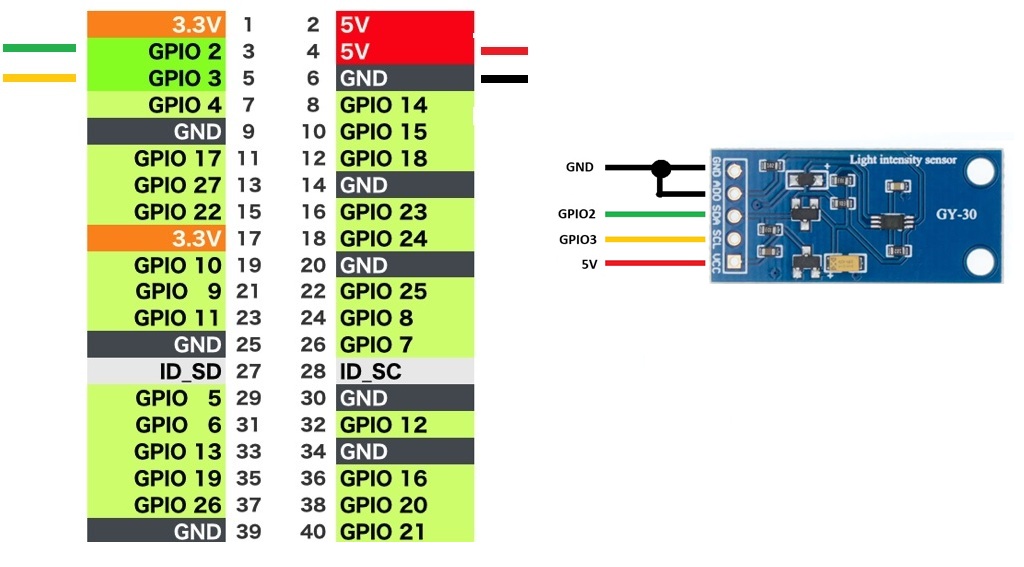
動作確認
ラズパイ 4/5 Model B ( Trixie Desktop 64-bit)
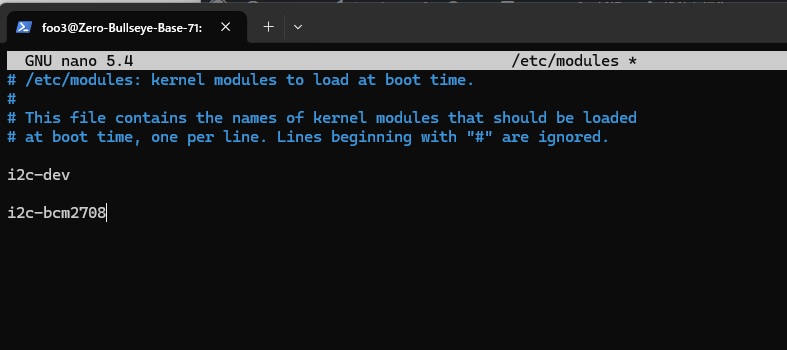
Zero 2 W ( Bullseye Lite 32-bit)
modulesを編集して、i2c-bcm2708を追記
|
1 |
sudo nano /etc/modules |
再起動
|
1 |
sudo reboot |
i2c-toolsの有無を確認して無ければインストール
|
1 |
dpkg -l | grep i2c-tools |
何も表示されなければ以下を実行
|
1 |
sudo apt install i2c-tools -y |
smbusの有無を確認して無ければインストール
|
1 |
dpkg -l | grep python3-smbus |
何も表示されなければ以下を実行
|
1 |
sudo apt install python3-smbus |
GY-30が使用されているI2Cのアドレスを 調べて0x23となっていることを確認
|
1 |
sudo i2cdetect -y 1 |
測定してみましょう。
【BY-30.py】
|
1 2 3 4 5 6 7 8 9 10 11 12 13 14 |
#!/usr/bin/python3 import smbus import time Bus = smbus.SMBus(1) Addr = 0x23 while True: LxRead = Bus.read_i2c_block_data(Addr,0x11) print("illuminance : "+str(LxRead[1]* 10)+" lx") LxRead2 = Bus.read_i2c_block_data(Addr,0x10) print("Luminance : " + str((LxRead2[0] * 256 + LxRead2[1]) / 1.2)) time.sleep(1.0) |

Leave a Reply